First of all, congratulations on the MCP implementation. I was curious to see what it could do, so I enabled the MCP server and explored the available tools. It’s one of the most complete MCP implementations I’ve seen.
While experimenting, I realized there is one workflow that would be incredibly valuable.
Today, ChatGPT for macOS can work directly with some text applications (Apple Notes, TextEdit, Terminal, etc.). Unfortunately, Agenda is not one of them.
As an Agenda user, what I would really like is this workflow:
Open a note in Agenda.
Ask ChatGPT something like: “Summarize this meeting”, “Reorganize these notes” or “Turn this into an email”.
ChatGPT works directly on the note that is currently open in Agenda, without any copy and paste.
I noticed that the MCP server already exposes excellent tools to search, read and edit notes, but I couldn’t find a way for an AI assistant to access the note that is currently open.
I’m not suggesting a specific implementation, because you know the architecture much better than I do. Whether this is best solved through MCP (for example by exposing the active note) or through another integration with ChatGPT is entirely up to you.
I just wanted to share the workflow, because I think it would make Agenda one of the best AI-powered note-taking applications available.
ChatGPT specifically can do something like that already: If you open a chat in the new ChatGPT app that fuses Codex and ChatGPT and then start a new chat in “ChatGPT Work” you can attach an “AppShot” (I think thats what they are calling this), basically giving ChatGPT access to a specific window with all its contents, it is also able to navigate the window and write into notes etc. if you grant it the necessary permissions. I just tested this and it can for example summarize a note from the window and also write something into a note. To achieve this you can either enable a keyboard shortcut for this (default is double command) or go via the + - menu in the app, as marked in the picture.
I tried it right away, but I think I’m missing something.
When I use the + → Screenshot → Agenda option, ChatGPT only seems to receive a static screenshot of the Agenda window. It can read and summarize the visible content, but it cannot interact with the application or edit the note.
Could you tell me a bit more about your setup?
Which version of the ChatGPT app are you using?
What exactly do you mean by “ChatGPT Work”? I don’t seem to have that option.
When you say ChatGPT can write into notes, does it actually modify the note inside Agenda automatically, or does it generate text that you then insert yourself?
I’m very interested in reproducing your workflow, because it would be exactly what I was looking for.
Great to hear the MCP server held up to that kind of exploration, thanks!
You are right that there is currently no way for the assistant to know which note you have open in Agenda. The tools work the other way around: the assistant finds the note via search or by title, and can then read and edit it directly, no copy and paste needed. So “summarize this morning’s meeting note” works today, but “work on the note I am looking at” does not.
Exposing the currently selected note through the MCP is a nice idea, and would make that workflow much more fluid. We’ll take it along.
I’m using ChatGPT 26.707.91948. This is the newest version, where OpenAI brought together ChatGPT and Codex into one app a few days ago. If you say you have + –> Screenshot –> Agenda I assume you are running the app that is called ChatGPT Classic now. You can download the new version here:
The UI changes a bit, as this is more focussed on letting the AI really do things instead of just providing replies, so be warned In the new app you can then follow my screenshot from above by switching over to ChatGPT after having opened your Agenda note, clicking “New Task” and then adding “Agenda” from the + - menu.
In the new app you will also be able to see ChatGPT Work at the left top. You can choose between Work and Codex there, with Work being more focussed on everyday tasks and Codex being more focussed on coding.
With this approach, ChatGPT can actually modify notes inside Agenda without you having to copy paste something.
Hope this helps. Let me know if this still doesn’t work, then we can try to dig deeper.
I installed the new ChatGPT app and tested the Computer feature with Agenda.
It does work: ChatGPT is able to take control of the application, navigate through an open Agenda note, scroll it, read it and interact with it.
However, it feels quite different from the native integration with Apple Notes. Since it operates by controlling the user interface, it is noticeably slower and requires additional macOS permissions (Accessibility and Screen Recording).
I was actually wondering whether there is, or will be, a more direct integration with Agenda through its MCP server rather than UI automation. That would probably provide a much faster and more reliable experience.
The MCP server is that more direct integration. Once connected, ChatGPT can search, read, and edit notes through it directly, no UI automation involved, which is a lot faster and more reliable.
What is missing is the piece from your first post: a way for the assistant to know which note you currently have open. That is on our list now, along with making the MCP setup in ChatGPT as automatic as it is with Claude.
The MCP approach is exactly what I was hoping for. After trying the new ChatGPT Computer feature, it became clear that direct MCP integration is the right long-term solution: it’s faster, more reliable, and doesn’t rely on UI automation.
Being able to expose the currently selected note through MCP would make the workflow feel almost seamless. Combined with automatic MCP setup in ChatGPT, it would be a fantastic experience.
Thanks for considering the idea, and thanks to the whole Agenda team for embracing these new AI workflows so early. I’m looking forward to seeing how this evolves.
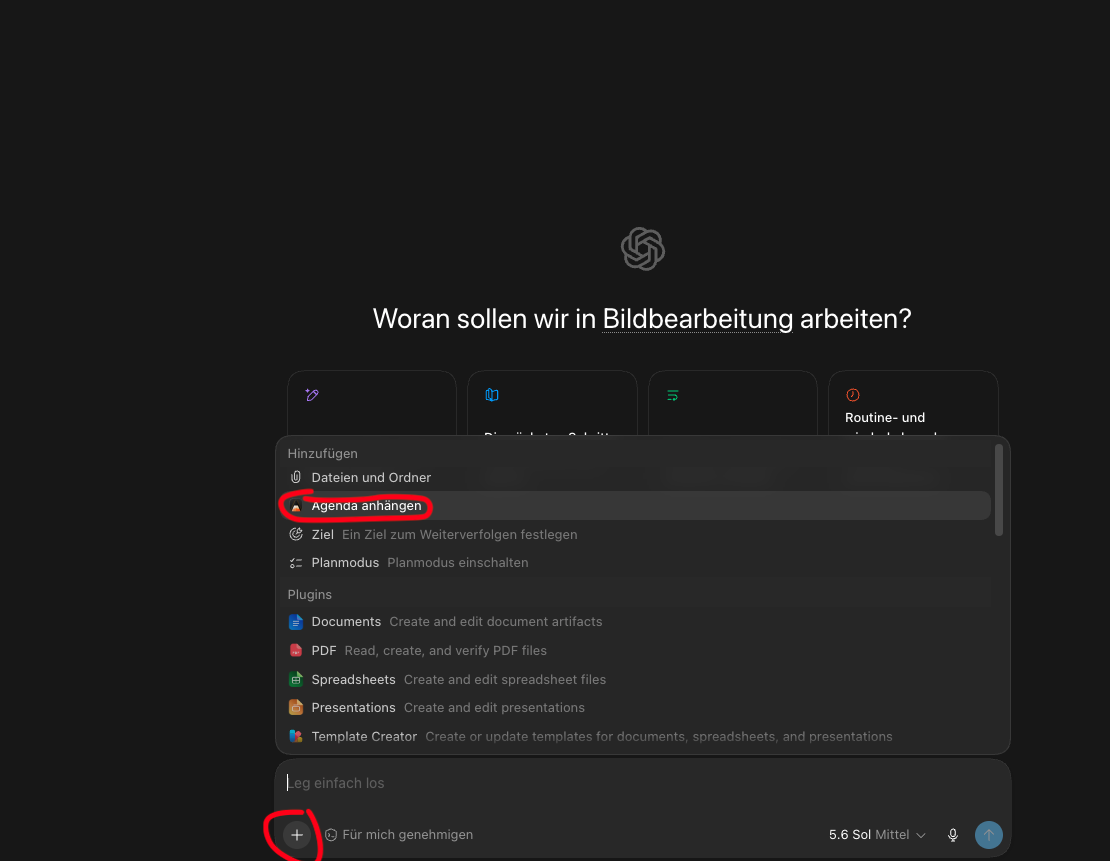
 In the new app you can then follow my screenshot from above by switching over to ChatGPT after having opened your Agenda note, clicking “New Task” and then adding “Agenda” from the + - menu.