A task without a duration is just a sentence. It’s been brought up before but…
…it still does not seem to be a high priority for implementation.
It is not yet clear how many users would need or prefer the “duration” feature.
And the “how” is probably not yet known to everyone interested.
Of course, you can find that out here.
For example, I use the structured daily planner.
I find it very practical. I set the start time and then the estimated duration. I do this very easily on a slider with presets in the range of 1 minute to 1.5 hours. The end time is then automatically corrected. However, this is not as relevant to me as the duration. When creating a task, I don’t really check the time when I will be finished. I can then postpone this task or change the date. The duration remains the same.
However, duration is probably less important for people who have many appointments or tasks. Their day is already well planned and they just need to fill in the gaps.
I often have one note per calendar day and this note has a few checklist items as tasks with a specific duration.
Agenda cannot currently display the duration in any form that I am aware of.
It’s not the end of the world, but it would be very welcome.
We are a bit married to Reminders for this, and I don’t think they have any way to set a duration. Correct me if I’m wrong.
We would rather not build a completely new reminder system alongside the built in one.
I think the closest we come to this now is that you can select a range of dates for a note/calendar event. But that is at a larger granularity that you would want, I guess.
That’s fine too. It’s a clearly defined interface and therefore also the dependency.
I find it very interesting how much we talk about the duration of a task every day and how few tools use exactly this data.
For example, if I call an electrician to repair my solar panel system, the first thing I ask him is how long it will take, not when he will be finished with the repair. Only then do we agree on an appointment that fits the estimated repair time. In the service sector, this is probably the most common way to plan the working day.
Implementing this in Agenda only works if I create a note for each task and assign the event to the note in the calendar, e.g., repair solar system at customer A’s, Monday 12:00-1:00 p.m. At the end of the year, there will be a lot of notes.
For appointments with lots of notes, this would definitely be an advantage, and I would do exactly that.
But if I plan a day and create a note with lots of tasks for it, the duration of which I can already estimate very well, then I have no way of linking this data to the tasks and visualizing it on the timeline. The total duration of the tasks could very quickly exceed the possible working time and thus distort the planning.
I admit, it’s a bit far-fetched and doesn’t necessarily have a practical application in Agenda, but…
Only a note can be linked to an event and only a reminder to a task.
Something is missing in between.
Edit: The data already exists here. It is just not being followed up on.
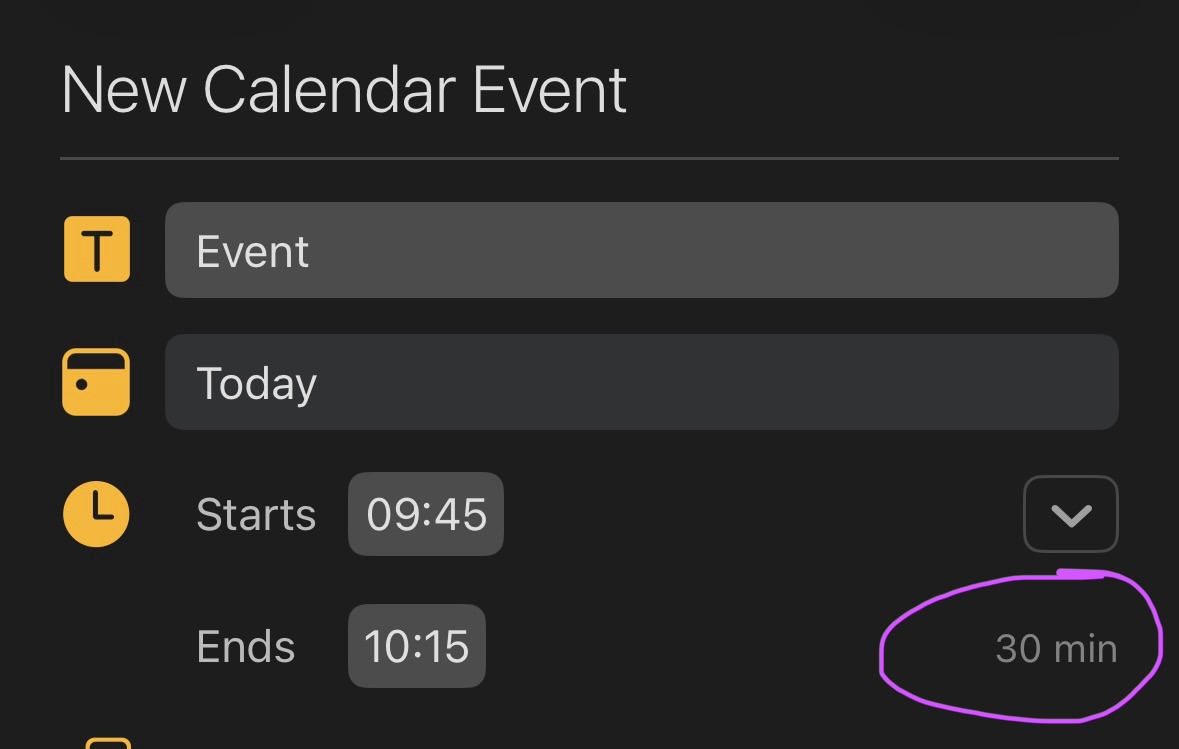
1 Like
I think there is a fine balance between being a note taking app that compliments your calendar and todo list, and trying to be it all. A lot of these things are best done in those other apps.
If it would help to be able to link calendar events from inside a note, so you can assign individual tasks to a bunch of meetings, eg, we could consider that. Perhaps that would be a good option.
1 Like
What’s wrong with #duration(30) ?
Currently you can’t link to calendar events (or create them) in the content of a note. If we add that option, then indeed something like \event(duration: 30) would make sense.
1 Like
Sounds interesting.
I’m sure you’ve already thought this through.
What exactly would this text action do?
- Would this link then be displayed in some form on the right-hand side of the timeline?
- Where would we see the 30 minutes?
- What happens if the sum of the individual tasks/appointments within a daily note exceeds 24 hours?
I haven’t thought it through in any detail, no.
Don’t think it would appear on the right side, other than that all calendar events appear there. Perhaps a menu item could show all notes that include the event as content, so you navigate to them.
I don’t think you would see the 30 minutes, other than that perhaps you could click the event and it would show a popover very similar to what reminders does. Ultimately, you see the 30 minutes in your calendar. That’s the whole point.
There is no constraint on how much time you assign, just as calendar has no restriction. It’s up to you to arrange events. They can overlap too.
Note I am not proposing a whole new calendar mechanism here, just the same calendar we have now, but the ability to effectively link to calendar events from inside content, the way we do with reminders.
1 Like
Thank you for your detailed reply!
What you have described is not intended to replace the current calendar. It is only meant to be a small addition that integrates neatly into the existing system.
At the very least, it is a good approach that could perhaps be used in Agenda. The seed has been sown, now it just needs to be watered 
I am curious to see whether other users would find this feature useful.
I’ve used time blocking to plan and manage my time. At one level I find it very helpful to keep on track and avoid getting distracted.
However, I’ve tried various approaches and I’ve always reverted to manually writing my day plan in a paper notebook.
One problem with using the Calendar is as pointed out in this thread, setting the duration of tasks.
Another problem is where do you ‘store’ these “tasks with duration” until you decide when you want to tackle them - ie weekly or daily planning sessions. I don’t think adding adding /event(duration) could solve this problem.
One app that attempts this fairly well is Scheduled - from memory they add Duration to Tasks. I trialled it for a couple of weeks but gave up - largely because there was no way to automatically move tasks that you don’t manage to complete back into the ‘waiting to be scheduled’ pile. Also the integration with Apple Reminders was very weird - from memory you actually ended up importing tasks into Scheduled rather than syncing, which became messy.
I for one would like this
I could imagine doing it like this:
- Select the paragraph of the task, or ideally everything that can be folded into a note.
- Click/tap on an event in the timeline on the right.
- Click on “Link to selected paragraph” in the menu.
- An indicator icon appears next to the event in the timeline.
- A calendar icon appears at the end of the paragraph, preceded by data showing the total duration if the start time has not yet been reached, or the remaining time. Then “..finished” and “x time ago” in red.
I have no idea if this would even be possible in Agenda.
Would also like something like this, NotePlan has an interesting time block feature but being able to block out from the agenda note would be cool
Thanks for the additional thoughts everyone. Time blocking is an interesting area. We will take the ideas along!