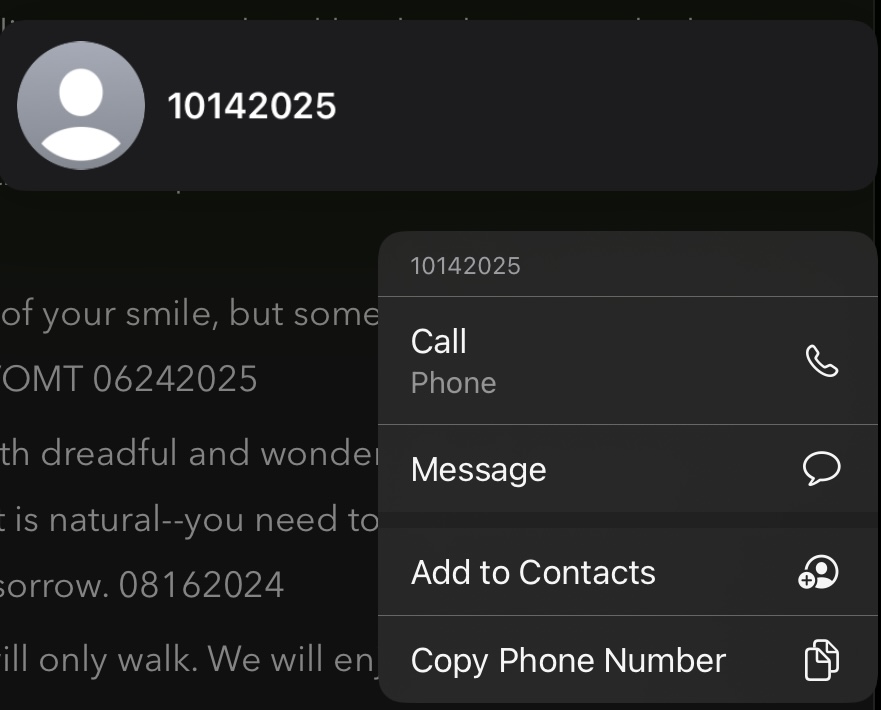
What I expected: This behavior used to happen and then it stopped. This behavior started happening again just after a recent update made 3 days ago. In the past when this happened, my workaround was I’d press and hold the number and select option “Convert to text’ but this option is no longer there. Instead, the action menu has only Call, Message, Add to Contacts and Copy Phone Number as options.
This annoying change is occurring without an easy way to fix it. I am able to click the |–| button on the format bar which converts the number string to text but adds “tel:” to the number which I then must remove. Too many steps and very annoying. How did this action menu lose “Convert to text” and how can I get the ability back? Or is there a setting I can change so strings of numbers remain strings of numbers unless I want them to be something else?
Things that might be helpful to know (Agenda version, OS and model, etc):
Agenda Version 21.0.2 (356), iOS 18.7.1, Model iPad Pro (11-inch) (2nd generation)
There was a time when I had to write down several strings of numbers every day. Fortunately, this is no longer the case.
I still don’t understand why:
it is generally assumed that multiple numbers always constitute a phone number
after conversion to text, “tel:” appears and I then have to delete it again. From my point of view, I haven’t entered a phone number, but a series of numbers
it’s not possible on the iPhone to simply type a string of numbers without special effort.
no better recognition of phone numbers is built in. Something like 0123 456789, or starting with +0123…
To be clear, this behavior is built into Apple’s operating system. It is not something we developed in Agenda directly.
I think what is happening is that the substitutions code is converting that number into a call link. I would think you can select the text, long click on it to get the link details, and make it not a link.
If you want to paste something and have it not get converted, you should be able to type a backslash (\), then paste. That should prevent any special handling of the text.
I am aware of that.
But I am just confused by the way Agenda handles it.
In Bear, for example, I have the freedom to simply type in multiple numbers. But if I want to enter a linked phone number, I have to enter something like [Charly Chaplin](tel:0123456789). It feels logical without knowing how Bear handles it.
That’s exactly what doesn’t work anymore. The option to remove the link has disappeared.
Unfortunately, that doesn’t work.
After entering \0123456789, I get tel:0123456789 as a link.
I am currently aware of the following options:
"0123456789"
`0123456789`
\fixed<space> 0123456789
“|-| fixed-width” -menu button and 0123456789
Perhaps there is a way to simplify this in Agenda.
I would be very grateful if there were❣️
One more quick note.
In Obsidian, Craft, Notion, and Goodnotes, it is also possible to enter a string of numbers directly without it being automatically converted into a link.
These apps mainly use link syntax such as [link text](tel:0123456789) for linked phone numbers.
Yes, you should be able to use the same format in Agenda. We support markdown link format.
The phone number detection is from the system, and you should be able to turn it off. On macOS, you can simply select some text, and go to Edit > Substitutions > Data Detectors. That should turn it off.
It seems iOS doesn’t have such a setting, which is annoying. We’ll at least get the link removal working again, and see if we can get the backslash working too.