Just found out about and tried this feature. Nice feature but cannot get \move command to work - only puts note in inbox. Also not sure of correct spacing in \move command. What am I missing? Thanks!
Hi,
Glad you’re trying it out.
A couple of things on \move. First, the project name needs to be in quotes:
\move(“ProjectName”)
Without the quotes, it gets left in the note as plain text.
Second, we’re still ironing out text actions running automatically on inbox notes. A few like \move are working in the current build, others like \reminder still need work because they require UI. So if quoting the project doesn’t fix it for you, that’s something on our side to sort out, not a setup issue on your end. Let me know how you get on.
Kind regards,
Drew
Good morning,
Thanks for the reply!
I’ve used the quote marks but have tried with and without any spaces after the word move. Nothing works. They all landed in the inbox without stripping out the command syntax.
Thank you
Bill Tyler
Hi Bill,
Thanks for trying again. Sorry to confirm it, but this is on our side.
Even with the correct \move(“ProjectName”) syntax, automatic text actions on inbox notes are still not running reliably in the current build. We have a fix in progress so that the actions get processed when the note lands in the Inbox. Until that ships, your notes will keep landing in the Inbox with the command text in place.
The workaround for now is to open the note in the Inbox and let the text action run there, or move it manually.
The fix will be in version 23.1 coming in a few days.
Kind regards,
Drew
Thank you for developing this premium feature. It is a very helpful app, and I look forward to seeing added functionality, such as \ota and \assign-date().
Thanks! You can actually already use \assign-date. Put it in the body of the email, eg \assign-date(friday). A lot of the other text actions work there too, though not all of them. There is also \on-the-agenda
Drew
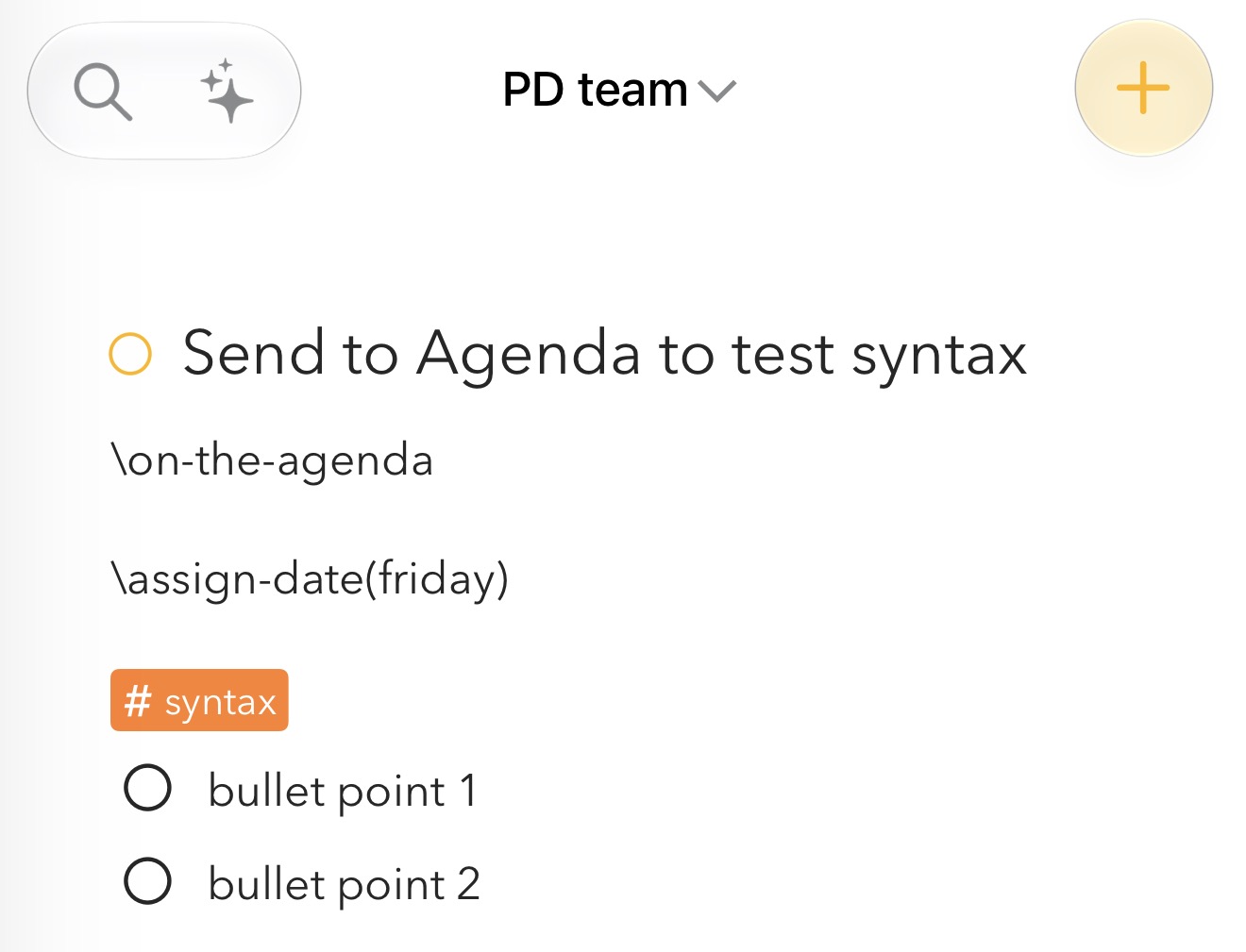
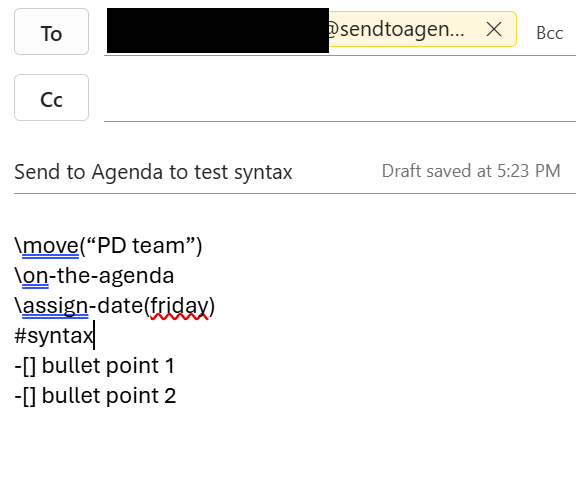
Thanks for the screenshots, that is clear. The \move and the tag came through, but \on-the-agenda and \assign-date(friday) stayed as plain text. I’ll look into why.
Found it and fixed it. \on-the-agenda and \assign-date(…) in the body of the email will work in the next update, along with \done, \pin and the day actions like \friday. Keep them in the body, not the subject.
Thanks for the clear screenshots!
Drew
Thanks for the fix. I found an issue that I would like to share with you which only occur when drafting the note using the web-based iCloud.com.
I inserted 2 bullet points using “-[]” and pressed Enter to move to the next line. However, whenever I use web-based iCloud.com Mail (on the browser) to SendToAgenda, the bullet point does not carry over to the next line, which you can refer to the screenshot provided.
On the agenda, the text appears as plain text. It does not recognise “-[]” as a bullet point or Enter as a new line. Every message is appearing in one line.
This issue does not occur when I draft the note in Outlook or iCloud Mail on an iOS device. Strangely, it only happens when I use iCloud.com, the web-based version, to draft the note.
This is what I typed in the body of the email:
\move(“PD team”),
\on-the-agenda,
\assign-date(next monday)
#syntax
-[] bullet point 1
-[] bullet point 2
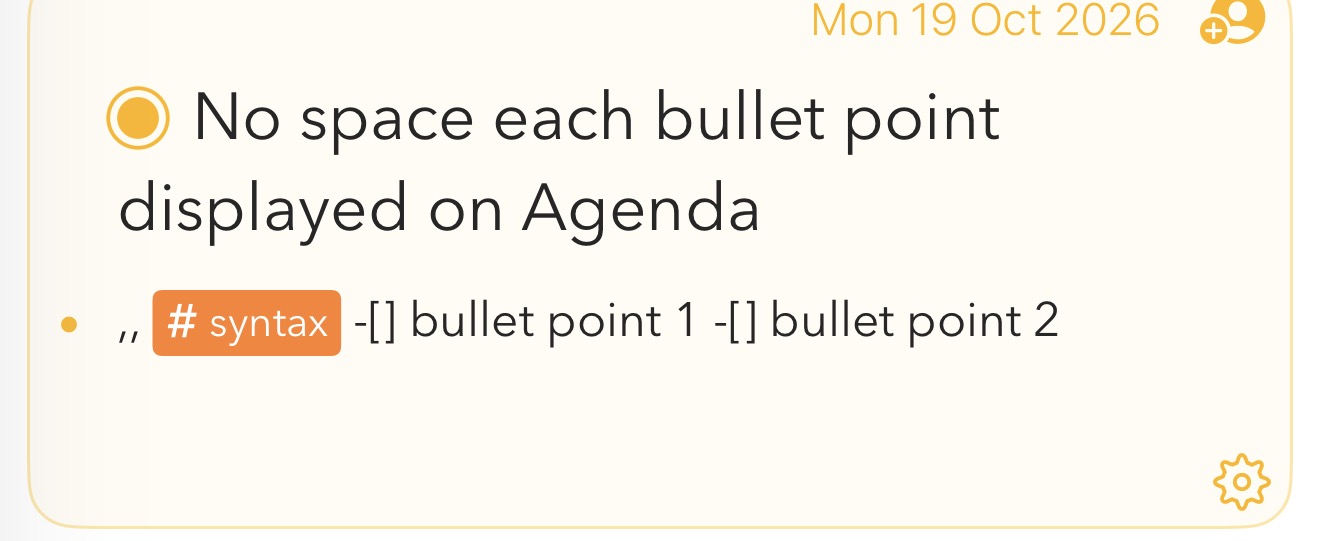
Thanks. It seems like it might put in a different type of new-line character. I will investigate this.
Thanks for the clear report. iCloud.com sends its mail differently to Outlook and iOS Mail, and our server was losing the line breaks. That is fixed now on our server, so no app update is needed. Just send it again from iCloud.com and the lines and checklist items should come through.
Drew
I tested on iCloud.com but the fix seems not addressing the it. Thanks for the prompt response to address the problem.
Thanks for testing. You are right, it is not fully fixed. Looking at our server, “iCloud Mail box TEST” came through with its line breaks, but “macOS space test” still arrived as one line, with spaces where the breaks should be.
Which app or browser did you send each of those two from? If the one-line one came from iCloud.com in a browser on the Mac, it is probably sending a plain text version of the mail with the line breaks already removed, and we can work around that on our server.
Drew
If I remember correctly, “iCloud Mail box TEST” note is using iCloud Mailbox App. Sorry I could not remember which App or browser I send for "“macOS space test” note but it look like this on Agenda,
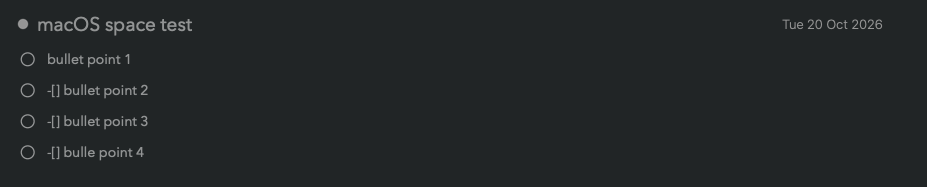
You can look into the server and find this "iCloud Mail web-based on macOS” which sent on 12 October using Safari browser on macOS. By the way, I tested on both Windows and MacOS and also Chrome and Safari browsers. As long as the note is sent via iCloud web-based on any browser this issue will happen.

We think this is fixed now. We will have a release today. Please test that and see.
Kind regards,
Drew
A small correction to my last post: the fix is on our server, so you do not need an app update. Your iCloud.com tests showed us what was going on. iCloud.com sends a plain text copy of the mail with the line breaks already joined up, and our server was using that copy. The server now handles it.
It only applies to new mail, so the earlier one-line notes will stay as they are. Could you send one more test from iCloud.com in the browser, with a few lines and a checklist, and let us know if it arrives with its line breaks?
Drew
Sorry, I spoke too soon there. Your iCloud.com tests showed us what was really going on: iCloud.com sends a plain text copy of the mail with the line breaks already joined up, and our server was using that copy. We have changed the server to handle it, so no app update is needed.
It only applies to new mail, so the earlier one-line notes will stay as they are. Could you send one more test from iCloud.com in the browser, with a few lines and a checklist, and let us know if it arrives with its line breaks?
Drew