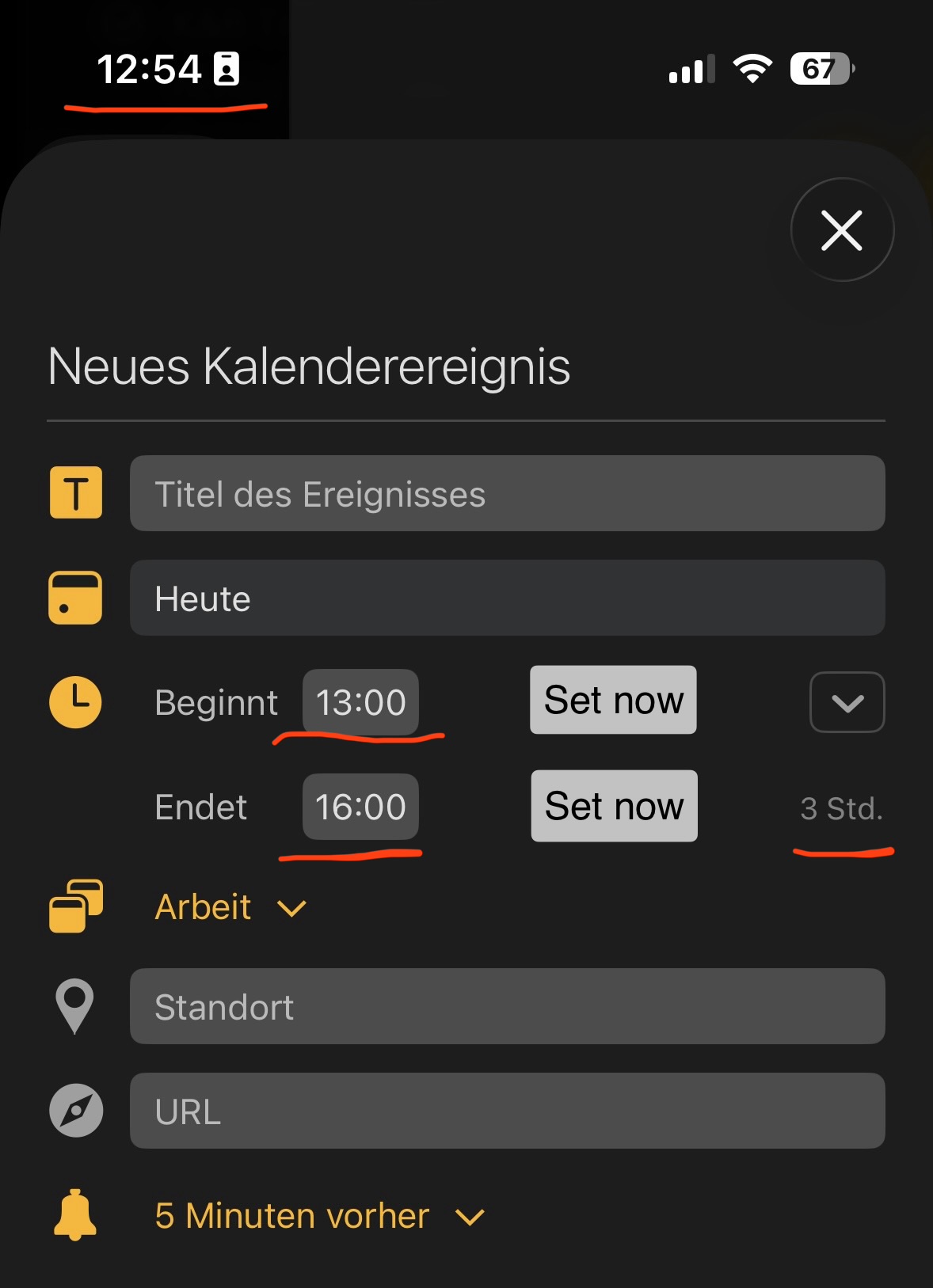
I’d like to track an event by setting timestamps for the start and end. The second action would then create an event in the calendar showing the duration tracked.
I don’t yet have a clear picture or details of how and where this would work, but I could imagine a text action acting as the trigger. It might also work if you select ‘Today’ in the timeline and use the pop-up menu.
The text in the relevant note on the current line would be used as the title of the appointment. Another option would be a similar but simplified version of the ‘New Calendar Event’ window, where the title and other details can be entered.
I’m just wondering how it is different to setting up a calendar event now. You should be able to set and change the duration of the event, to match the end timestamp.
If it doesn’t work — changing the duration — let me know and perhaps I can just make what is already there work better.
However, I’d like to be able to set a start time quickly and precisely at the moment of creation, and to set the end time easily. Manually adjusting the time is too time-consuming for frequent time tracking.
An extra button for ‘Set start now’ and ‘Set end now’ would be a possible solution.
Ah I see, thanks. So the New Calendar Event sheet already has the Set now buttons and shows the duration, but when you tap Set now it rounds to the hour (13:00) rather than catching the exact time (12:54). For time tracking you want it to grab the precise current minute.
That makes sense. I’ll take a look at having Set now use the exact current time, and take the quick start/end tracking idea along with the duration request.
In principle, everything is correct.
It’s just that the buttons don’t exist in that form yet. The two ‘Set new’ buttons in the edited image above are merely an example or a suggestion.
Created I believe is the only (?) info parameter that is saved. I tried something similar to what you are doing and just couldn’t deal with the attention needed distractions. Creating the note with creation date was straight forward but the rest was simply untenable. However, I was tracking “note creation time” w/ assembling the data necessary, research, charts&graphs, rewrites etc; I tried for one project and went back to pricing on a per project basis which was best for me and the companies didn’t want to deal with the hourly stuff anyway. @drewmccormack mentioned Timing in a past post. They have become one of the best but I think now over priced.
PS: do they give a discount for posting Agenda as one of their integration?
The Timing app is too complex and far too expensive for my needs. The subscription model makes it even less appealing.
And I don’t want to go that far or that deep.
I’m thinking more along the lines of simple time tracking for unplanned tasks, assignments, or appointments. And mainly while on the go, using an iPhone or iPad.
Ideally, I’d also like the option later to assign that tracked time as an event to a paragraph, a list, or a checklist. We discussed this topic not too long ago…and it still seems far off in the future.
The Agenda timeline is probably the perfect visual place to display time logs within a single day.
I just realized that I can’t create a calendar event on the iPhone with start and end times specified down to the minute. It works on the Mac. It’s not just the 5-minute limit on the iPhone, but also unpredictable results when entering the time directly via the keyboard. For example, adjusting the minutes often causes an unintended jump to the next day. A small typing error corrupts the data.
I’m not sure, but it might also be an iOS quirk.
I’ll bundle this with the Set now precise-minute idea and the duration request, and see how the quick start/end tracking could fit together. Thanks for the detailed thoughts.
As a freelancer, I personnally use since years Tyme app. It is compatible with Calendar and you can create a calendar in which is recorded every time tracking.
It is also a subscription but cost a quarter of Timing app. I think it is developed in Germany and has plugins for many applications (accounting, calendars).
A plugin allowing Agenda to sync with Tyme would be great