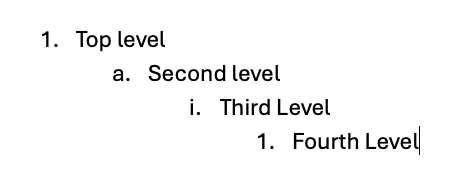
I would like to have mulitlevel outline numbering. I work with complex outlines and this would help a lot avoid renumbering/reindenting when extracted. Related to this is retaining format for smooth cut and paste into other apps like email and word docs.
We have added some support for controlling numbering, but it isn’t that user friendly yet. We need to improve on that.
If you want to use it now, here is how it works:
First, just tabbing in should give you different levels of nesting. So you can get just standard numbers for sublists.
You can also make lists start at a different number. To do that, you can delete the existing number and type your own, eg “5. content”, and it should continue the list at 5.
If that doesn’t work well, you can just type \numbered(start: 5) anywhere in the list item.
Lastly, you can also change the style of the numbering. Eg. \numbered(style: roman)
More Detail:
Custom List Numbering
Agenda supports custom numbering styles for ordered lists using the \numbered action. Type it at the start of a line to convert it into a numbered list.
Basic Usage
Simply type \numbered to get a standard 1, 2, 3 numbered list.
Parameters
The \numbered action supports two optional parameters:
Style (style:)
Controls the numbering format:
letter, letters, alpha, or abc — a, b, c
roman, romans, i, ii, or iii — i, ii, iii
number, numbers, numeric, or 123 — 1, 2, 3 (default)
Start (start:)
Sets the starting number, e.g. start: 5 begins counting at 5.