9cq
September 27, 2025, 12:05pm
1
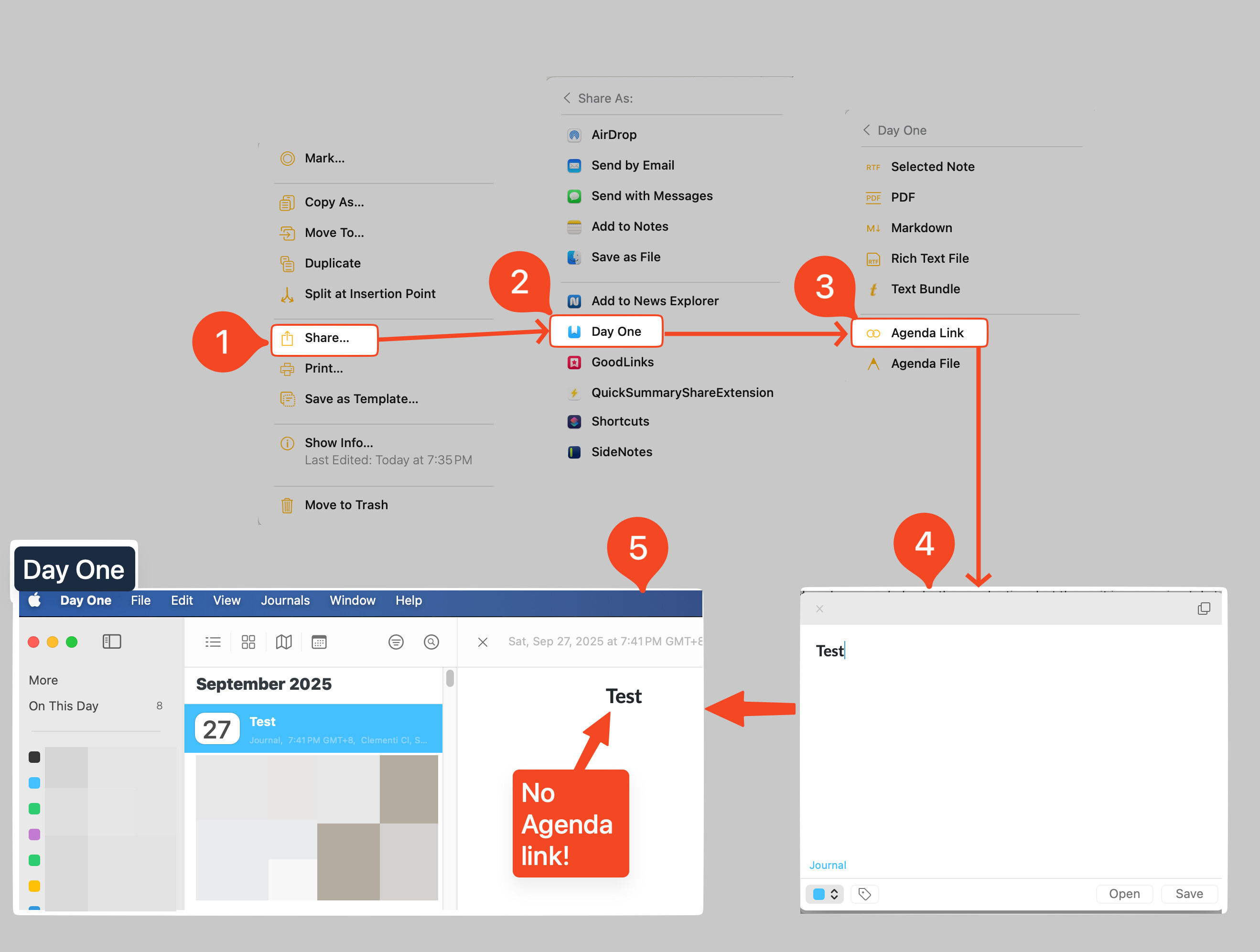
What I did: I shared the Agenda Notes as a Agenda link to Day One app.
What happened: There were no Agenda link created in Day One entry.
What I expected: An Agenda link created in Day One entry.
Things that might be helpful to know (Agenda version, OS and model, etc):
Agenda Version 21.0.2 (356)
It’s difficult to know where that goes wrong. It might be on the Day One end. You could try testing it with other apps to see if the link appears.
Agenda can add a link, but it requires Day One to take it. You might be able to copy as > agenda link instead. Perhaps that works better.
Kind regards,
9cq
September 27, 2025, 12:59pm
3
How to copy an Agenda Link?
On Mac, there is an Edit > Copy As menu. Select a note, and choose that.
9cq
September 27, 2025, 11:01pm
5
Got it. Thanks
While I now see also a shortcut key indicated in the menu icon, is there an icon available that can be used instead of accessing the menu/shortcut key?
I’m not 100% what you are asking, but we don’t have a direct button to do copy as. Your options are:
Main menu Edit > Copy As
The cog button on the note at the bottom: Copy As
Right click, or CTRL-click top of note: Copy As
Share menu (though depends on the target app as to whether it will work)
Hope that helps!
Glad it worked out! Let us know if we can help with anything.