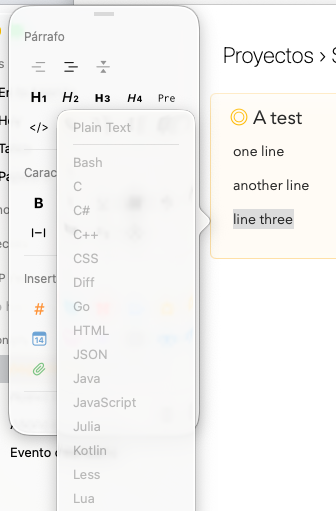
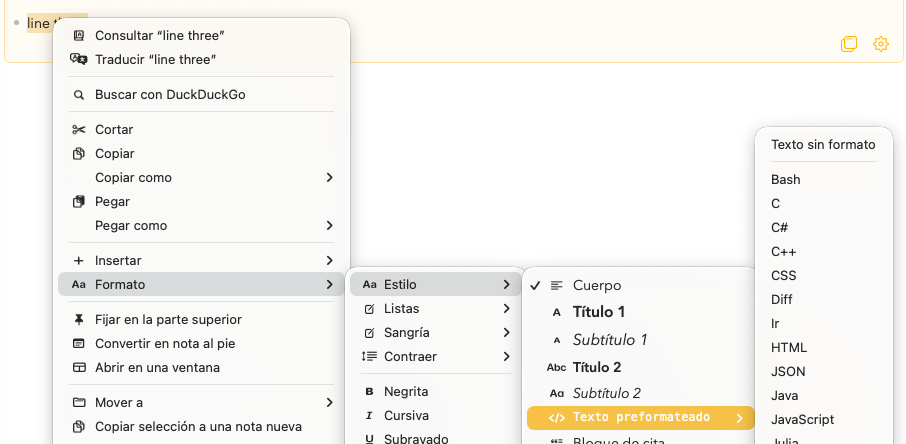
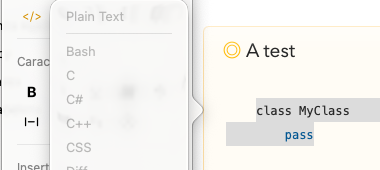
Sometimes not even the other options work (mouse 2, main menu), they are disabled too, but I can’t reproduce it, I’m not sure how. In that case I have to close the menu and open it again and then it works again.
There is no shortcut for this right? I mean a keyboard shortcut.
Thanks for the detailed report and the screenshots. The fact that the language submenu is empty in the dot popover, but works (eventually) from the context menu and the app bar, is a useful clue. We will look into why it is not populating in the dot menu.
There isn’t a keyboard shortcut for choosing the language, but I agree there should be a quicker path than digging down through the main menu. We will see what we can do.
That feature exists, however It’ doesn’t work as I expected.
You can use it for new code blocks but you can’t change existing paragraphs because you don’t type the closing ``` so after you leave the heading ```python the code block is created as a one liner block, so there is no way to format several existing paragraphs that way, which would be much better because that’s how most apps work, yes!
By most apps, I think you mean “most markdown editors”.
Agenda supports some common markdown shortcuts, but it isn’t a markdown editor. It doesn’t preserve the markdown. If you type “# Heading” it converts to a heading style and discards the #. Same with code blocks.
My advice is to use it like a command. Type ```python and then a space. It will convert to python format.
Definitely. I think It work just fine as is for most usecases except to format existing paragraphs because as soon as you type “```python” the code block is created, you cannot tell the closing ``` so is not usefull for that specific scenario.
In that cases you need to do it from the menu or clicking the dot next to the selected paragraphs to format all of them at once. Otherwise you can type “```python” then copy all of the paragraphs and paste them inside the newly created code block.
If there is any other way I’m very interested, I have many small code blocks.
Yes, that is the limitation. Once Agenda recognises the opening fence, the paragraph becomes a code block and the closing fence is no longer something you type, so you cannot wrap several existing paragraphs that way in one go.
For existing paragraphs the best path is the one you already found: select them and use the dot menu (or the format menu) to set the style to code, then pick the language. We will see what we can do to make the language picker reachable from the dot menu more reliably, as you originally reported.