What I did:
While using Smart Overview, I tried to filter results using the combination (AND condition) of three criteria: the tag #work , Unchecked items, and Incomplete Reminder items.
What happened:
Instead, the results showed items matching any (OR condition) of the three criteria (#work OR Unchecked OR Incomplete Reminder ).
What I expected:
I would like a toggle switch to specify whether filters should apply using AND (all conditions must match) or OR (any condition can match) logic.
Things that might be helpful to know (Agenda version, OS and model, etc):
Agenda version:20.2
OS:MacOS、iOS、iPadOS
The way smart overviews work is to take whatever search criteria you setup when creating the overview.
What you can do is to change the criteria in your search. Eg. Type in the terms, then click on each token to indicate if it must be in the result (required), or does not have to be in the result (optional).
Optional is like OR, and required is like AND. If they are all required, it is like AND for them all.
Then save the search as an overview.
Thank you for your response. However, following your instructions still doesn’t achieve what I need. To clarify my request, I’m providing two sample notes below. Could you please:
1、Demonstrate the exact steps to implement this filtering, and
2、Create a Smart Overview containing only the first three to-do items (with the #work tag) as shown in this example:
Sample Notes:
Note 1
– [ ] #work This is line 1
– [ ] #work This is line 2
Note 2
– [ ] #work This is line 3
– [ x ] #work This is line 4 (completed - should be excluded)
– [ x ] #life This is line 5 (completed - should be excluded)
Critical Requirements:
• The Smart Overview must show only lines 1-3
• Must include the #work tag
• Exclude both completed items (lines 4 and 5)
I’d appreciate your guidance on how to configure this properly.
Ah, you mean the paragraph filtering. No, you can’t do an AND there yet. It is always an OR.
You can setup the overview, including paragraph filters like requiring #work, but you can’t require #work and require an unchecked item (AND).
I think the best compromise in the meantime would be to just require the #work tag. I guess you could introduce more granularity in tags to do what you want, at the expense of more work. Eg. #work-todo #work-done
We’ll see what we can do in future. Thanks for the feedback!
Thank you for your prompt response and the suggested workaround. While introducing granular tags (e.g., #work-todo) could temporarily address the issue, this approach significantly compromises the app’s core design philosophy of simplicity and efficiency.
The current method forces users to:
- Manually manage redundant tags (e.g., updating
#work-todo → #work-done upon completion),
- Abandon native progress-tracking features (Checklists and Reminders).
I hope this feature request can be seriously evaluated for future updates — it would greatly enhance Agenda’s value for power users.
Looking forward to seeing this elegantly implemented!
Best regards
We’ll certainly take it along, but be aware that what you are asking for is a lot more complex than what we have now.
Right now, you just click on the things you want to see in the notes. As many things as you like.
To implement your suggestion would mean the paragraph filtering would need to be more like the current search box, with tokens, AND/OR logic etc. IMO that is quite a bit more difficult to understand.
So it is tradeoff, as it often is, between flexibility and simplicity.
In any case, we can think about it. This is something we realized was a tradeoff when we started the process.
If you have any ideas for how it might work in the current UI, let us know. Be interested to hear them.
Hi Agenda team,
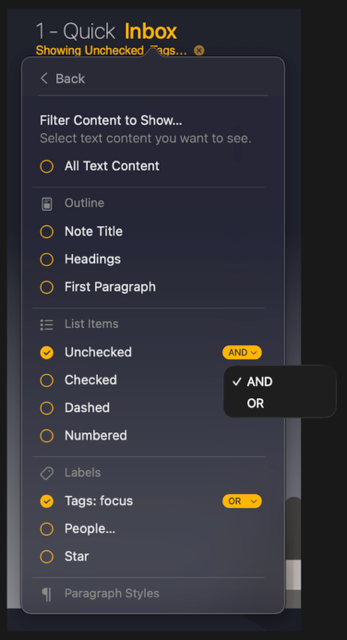
Thanks again for the thoughtful discussion about filter logic. After some reflection on balancing flexibility and simplicity, I’d like to humbly share a rough UI idea—still very much a preliminary thought:
- For active filters: Add a small dropdown picker (AND/OR) at the end of the selected filter row.
- For inactive filters: No visual changes, preserving simplicity.
Attached is a quick mock-up I sketched to illustrate this concept visually. It’s just a starting point—I fully trust your team’s expertise in evaluating feasibility and UX flow!
Appreciate your openness to feedback.
Best regards.
Yeah, this is actually a good idea. It is very much like the approach we use in the search, without the complexity of a search field. We could probably call AND and OR “Required” and “Optional”, but otherwise it’s a good approach.
It’s not a small change. It would require changes throughout the app an in the data model. But as an option, it is good. Will note it down, and hopefully can do something with it in future.
Thanks for the feedback! Very useful.