Can you add another focus mode? When I write something, I can’t see other things; there are too many things on the screen, which is a little tiring. Only pay attention to the current articles or paragraphs.
Hopefully, the video below can help you.
Thank you; it would be better if there was a special model.
I’m not sure from your post whether you are requesting that Agenda should come to the front and hide all other windows on your screen, or whether you want a particular article or paragraph to take up the entire Agenda window.
If it’s the first case, you can use the built-in capability in all MacOS applications to hide everything else except the app you’re working with.
Under the Agenda menu are these choices:
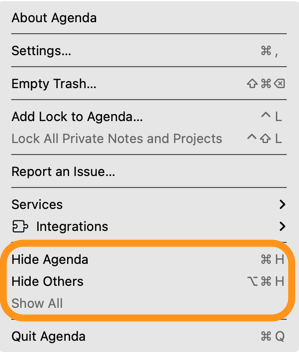
Choose “Hide Others” and you’ll get a less-distracting environment immediately.
That won’t help you with distractions, but you can hide both sidebars. In Agenda under the “View” menu:
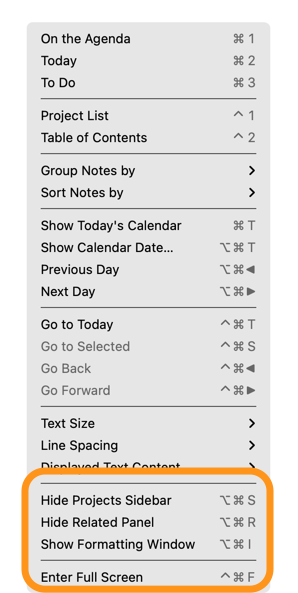
You can also “Enter Full Screen” which I personally find distracting because I’m the opposite of you and want access to other stuff while I’m writing.
It would, of course, be more convenient to have a single Focus command. You can fake that if you have a keyboard macro program. I use Typinator, but there are several good choices out there. With that, you can program a macro (a sequence of commands) that is triggered by a single keystroke that you select.
Hope this helps!
You can also open a Note or a Project (and I think a search result perhaps) as a separate window. It might be a premium feature. And make that window full screen.
I find Apples full screen setting very annoying and use Magnet instead to organise windows while still having the ability to move between them or tile them etc.