I truly wish that was the fact. But having worked in large multi-national companies before, specifically in Compliance, and knowing the games that politicians play, it wasn’t PR. Apple needed assurance that if they did make it available, the EU wouldn’t try to make them compromise users’ privacy and security (like the current UK govt tried to do), and that once released, the EU couldn’t change the rules retroactively and then fine Apple for not complying with rules that didn’t exist before.
So this is an interesting thing. My iPhone 16 PM is in English (US), as is my Siri language, since, after all, I’m in the US.
Pero, puedo usar las AI Writing Tools en español! No sé por qué lo trabajé.
but it’s cool. Other cool things: when I start typing to Siri, she’s giving way more suggestions than before … I’m guessing this means that the semantic indexer is actually present and running.
TBH, I don’t think anything has changed in the rules in the year or so since they started adding AI, so I think it is just a convenient excuse. Adding those extra languages is a hassle, and they nearly always roll out things in US first for this reason.
Loosely related: did you read about Schiller’s testimony yesterday. He had to admit that the 27% fee they introduced to get around one of the court findings was probably illegal, and definitely just out of spite. Point being, you shouldn’t just swallow the PR: Apple wanted to hurt the EU here.
Re: The new stuff. It is interesting that it is now becoming multilingual. Finally. It’s not totally unexpected, because most LLMs can change language at the drop of a hat.
As someone who just started using Agenda, the single most useful Ai-related function you could build would be in relation to what I would call ambient or passive scribing. I also use the spark email client which has an Ai-based transcription function that just sits in the background and listens to the meeting and then gives me a summary of decisions and action points at the end. I can give it a quick tidy up and correct any errors, and then I have my record for that meeting. With Agenda linking to my calendar appointments, it creates a complete end-to-end closed loop record for all my meetings without having to use any third party apps. Probably not using Ai techology to its fullest capabilities, but having that functionality build into Agenda would be a massive improvement for my workflow.
That’s great feedback, thanks! I actually have some experience with this type of thing, so we’ll take it along as an option.
I would also be quite interested in searching notes with AI. Ie give a vague description, and AI finds relevant notes.
We’ll think about it.
Well, WWDC 25 is over, and I’m writing this on my iPhone 16 Pro Max running on the first developer beta of iOS 26, and I’m quite impressed. Not just with the design - but with all of the work they’ve done with Apple Intelligence. While Siri probably won’t be a full-fledged chatbot until early 2026, it’s becoming clear that having a chatbot might not matter so much anymore.
Apple’s strategy has always been about Apple Intelligence - the system of APIs and models that enable the use of artificial intelligence in a completely private way, including enabling the personal assistant to use the capabilities and data contained in the apps on a device, through App Intents, App Entities and App Enums.
While Apple has decided to rearchitect Siri based on the latest on-device technologies, they’ve also enabled developers -and users- to take advantage of App Intents and the Foundation Models on the device and Private Cloud Compute in their Apps, in Shortcuts, and even in Spotlight on the Mac.
For example, here’s a shortcut that reads one of my notes in Agenda, uses Apple Intelligence to make the contents into a table and then appends the table.
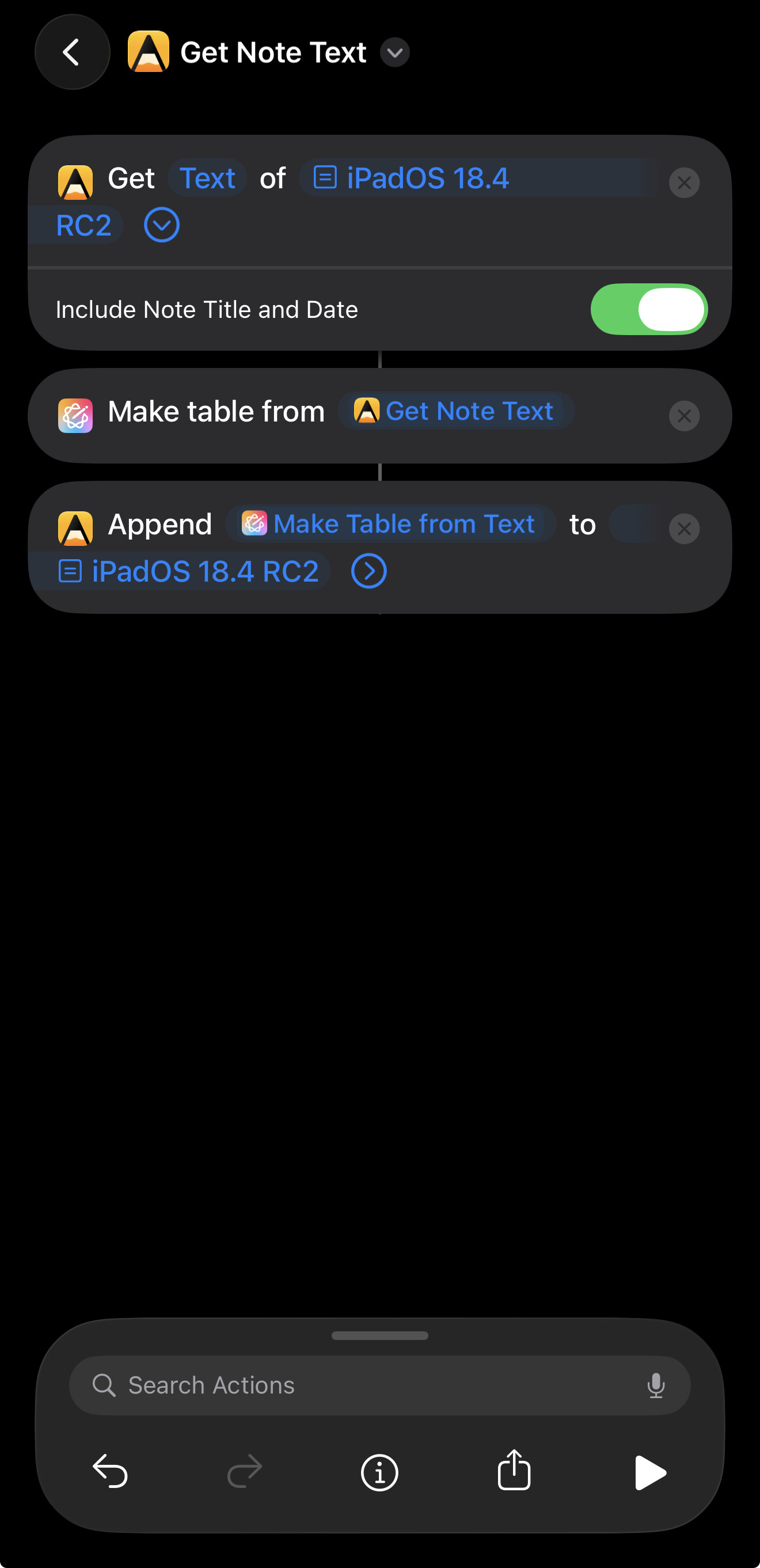
I have another shortcut I wrote tonight that uses the Foundation Model on device directly to turn whatever was supplied to it into Pirate Speak.
Hope this gives you some things to think about…
Absolutely. We are on the same page. Seems like that wait and see approach we took to AI may pay off in Agenda 21.
We see an opportunity to do the sort of things you are doing with shortcuts, but directly in the app, and probably a little more. The embedded LLM should allow us to give you tools to query your data like never before, and automate operations without knowledge of programming or even shortcuts.
Let’s hope it can delivers on the promise. We are working on it now. Stay tuned…
3 Likes
I think the most valuable use case is to build relations between notes and projects. I’m trying to find a good solution for building relations in Agenda because it seems broken IMO. It seems to only build a relation if I link to another note wtihin the one I’m in. If I link to the project from a note outside of it then it doesn’t show the relation which makes no sense to me. I have to manually add a link to the outside note for it to show up which is a waste of time.
Can you maybe explain this a bit more. I can’t follow exactly what you are doing, and what you mean by a “relation”. Can you explain that? I would like to understand the problem so I can look into it.
I’m sure someone will correct me if I’m off here, but I think he is trying to get to the ability to intelligently surface relationships between various notes across the system similar to how DevonThink does it. While the team at Devonthink built their on machine learning (ML or more loosely AI) logic for this, the improvements in generative AI should make this possible for Agenda.
As a corollary to this, relationship clouds like you can see in Obsidian or I think Notion might do this, too.
Both tools assist users in identifying information that might be useful to them in a second brain approach to using a note taking tool.
Your current calendar tool sort of does this but specifically with explicit time orientation and a specific time-line type of view. This is easier than the other two, because you are working with very explicit date/time data that does not depend on AI.
1 Like
Yes, Agenda does have heuristics for finding relationships. Those are the rules used to find related notes, and power relevant notes widget. Pre-AI, but reasonable. Eg. Look for links, matching tags, proximity in project etc.
The AI based approach is very likely using “embeddings”. That is certainly something we will look at more in future. Unfortunately, Apple are not shipping them with devices ATM, so adopting them would mean uploading all your data to the cloud — something we don’t want to do and can’t pay for — or including our own embeddings. A reasonable embedding engine comes in at around 300MB for a small one, which is just too big for a single feature.
Apple are introducing an on device LLM this year. We are working on integrating that. I guess they will add embeddings at some point, and we will certainly consider those for relations between notes.
1 Like
You might want to take a look at the content tagging adapter in Apple Intelligence in the ‘26’ series SDKs.
Ah, did not know about that. Will look. Thanks for heads up!
Update: OK, I took a look. Indeed I had seen it, but it is more for coming up with tags. Embeddings are a bit more general: they tell you if two documents are similar, not in words, but in meaning. That can be useful for search, because you can effectively say “give me the documents that most closely match this question from the user”.
Hopefully Apple will add it at some point. It could make fuzzy searching much more powerful.
Just my own feedback on the incorporation of AI into Agenda.
As a paying subscriber, I will drop Agenda like a hot rock if that happens. We don’t need any more of this AI slop.
That is all.
If I understand the comments from @drewmccormack correctly, they are integrating Apple’s take via Apple Intelligence and nothing more. You can turn off Apple Intelligence in Settings so that should kill that feature while still allowing those of us that pay and want AI integration.
1 Like
Embeddings (and the models that generate them) are fairly often used to implement RAG as a means of enabling AI queries to handle larger documents.
Plenty of embedding models on huggingface, although I think one comes in the box in 26. In any case, check this example out on github – GitHub - sskarz/Aeru: Apple Intelligence with on-device RAG, web search, private and free
Yes, the AI we have in there — writing tools — and what we are adding in a few months, is just what Apple have built in, on device. We don’t use cloud AI at all.
Yes, that is why we would like to have embeddings. Your Agenda library is too big to push into an LLM to do a query. With embeddings, we could gather important notes, and put those in.
There are indeed embeddings models on hugging face, which we have looked at, but anything decent comes in at about 300MB, which is a lot to add to our binary size. Hopefully Apple will add them on device, and every app can share the same 300MB.
Apple’s already spoken on this, in the AI & ML Group Lab held during WWDC.
Blockquote
Yes, it is possible to run RAG on-device, but the Foundation Models framework does not include a built-in embedding model. You’ll need to use a separate database to store vectors and implement nearest neighbor or cosine distance searches. The Natural Language framework offers simple word and sentence embeddings that can be used. Consider using a combination of Foundation Models and Core ML, using Core ML for your embedding model.
So it looks like you might be able to leverage the embbeddings from the Natural Language framework. Otherwise, the best path would likely be to let users select a CoreML embedding model if they happen to have already downloaded one, or facilitate downloading a preferred one from HF. Or host the model somewhere and download it from there - no need to add it to your binary.
Meantime, here’s an example shortcut that uses Apple Intelligence and the Agenda App Intents to allow you to select a note and summarize it. Requires one of the current Apple betas, e.g., iOS 26 dev beta 6/PB 3.
Works on my iPhone, hopefully it works for others…
My reading of that is that you can do RAG the way I described it. Download a model from hugging face, load it in using CoreML, and use it for embeddings, which you store in a sqlite DB or similar.
The problem again is that any decent model is around 300MB, and we don’t really want to add that to every download at this point. It would be better if Apple shipped the embedding model of 300MB for all apps to use.
The NL embeddings are a different type of embedding. The embeddings we want are related to full documents, where the NL ones are about words in a sentence.
We have RAG system coming in Agenda 21. It is not based on embeddings, but on spotlight. Hopefully will be useful for some things, but it is more likely a stepping stone to better things in future. (And it’s all on-device.)