Excellent - glad it’s working for you now!
Is Agenda shortcuts available in Mac OS 13 Ventura?
Yes, that should work. I just checked our code, and we are targeting macOS 13 and newer for this.
May I request Tags as a filter for the Find Notes Shortcuts action.
Thanks for the feedback!
Are you sure you can’t already search for tags?
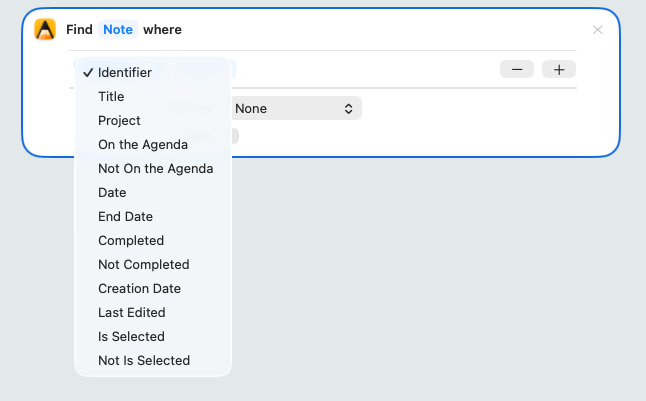
Does it work to search for #tag?
In agenda, tags are note content, rather than properties of the note itself.
I don’t see a way to search note content in Apple Shortcuts, other than iterating through the notes and using the Get Note Text for each one.
What I’m trying to do is use Shortcuts to automate a spaced repetition routine where I, for example, find all notes tagged containing the tag #weekly that were completed over a week ago, then mark them as incomplete and on-the-agenda.
OK, that surprises me. I wonder why we didn’t have a search option there. (I didn’t work on this code)
I will investigate…I’ll let you know.
I’ve added a Search Notes shortcut in the next minor release. Hopefully only a few days away.
Should make things much easier. You can provide any search like you would write in the search field, including tags.
Thanks for adding a search action to the Shortcuts!
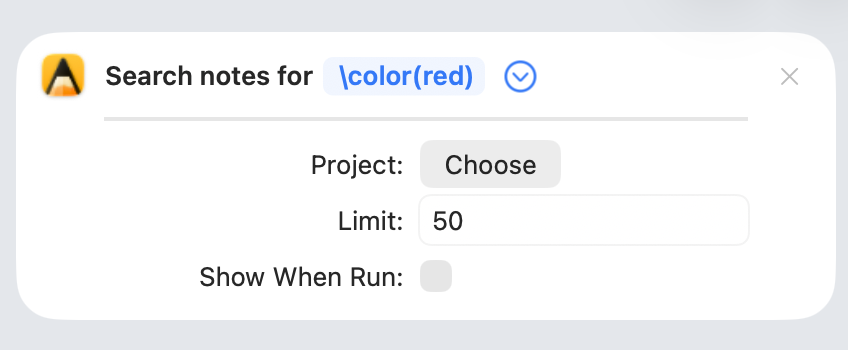
Is it possible to search by colour? I’ve tried \colour(red) as a query for the Search notes action without any luck.
What color do you mean? Background color?
I just tested the normal search, and it did find notes with the same background color based on \color(blue). Is that at least working for you?
Are you saying it does work in the normal search, but not via the shortcut? I would think it should but would need to check.
OK, will investigate.
Using the new(ish) Search Notes action, what would the syntax be to find notes that are incomplete? I’m guessing it starts with \done() but I don’t know what to put between the parentheses.
You’ve got the right idea. The parameter is no:
\done(no) finds notes that are not marked as done. In the search field it shows up as the token “not: done”.
The opposite, \done(yes), finds the notes that are marked as done.
Note you can also type \done space, and then click on the done token to choose “Exclude”, which leaves out anything that is marked as done. It is subtlety different behavior.
Thanks. To clarify, I was asking about the Search notes Shortcuts action, rather than the in-app Search field, so it’s not a case of clicking on tokens. But \done(no) did the trick there.
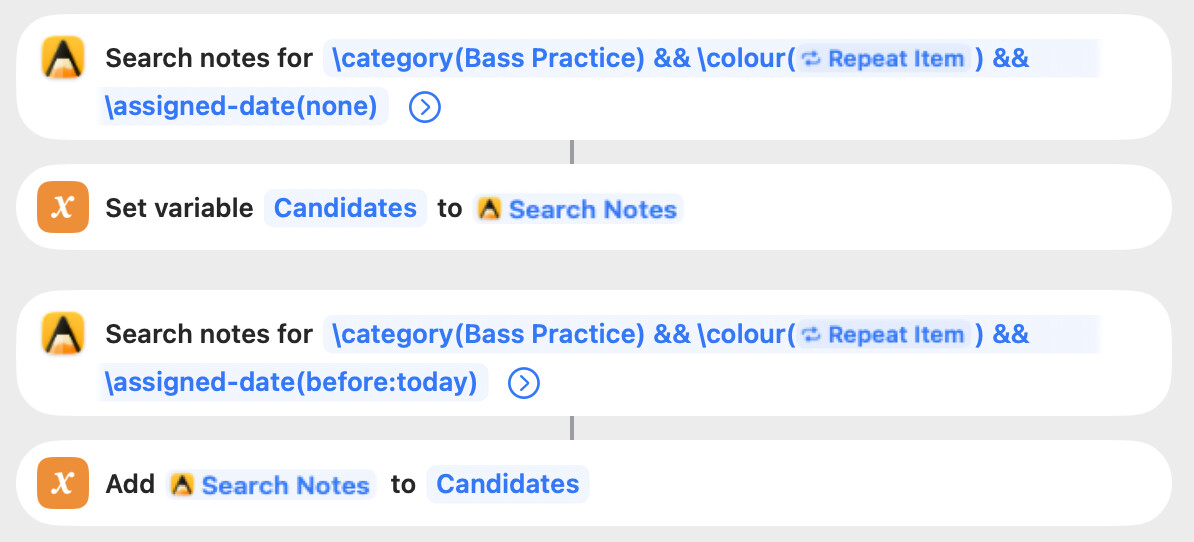
One more question, for this Search action, I want to exclude any notes that are assigned to a date in the future (so only include undated or assigned to a past date). But the following queries fails to exclude those notes. Any ideas?

I also tried this, which successfully excludes notes assigned to a future date, but fails to include those with no assigned date.


Thanks, and good detective work.
You are right that the Search notes Shortcuts action does not support the same full expression syntax as the in-app search field. I will try to bring them into parity in a future version.
Note that full grouping support is not even supported in the search field. Agenda has a different approach to the standard boolean operators, with required/optional settings for each term.
Search Notes Shortcut — workaround for “exclude future-dated notes”
(re: agenda.community/t/93151/37 — patrickrushton)
Tracked as: github.com/MomentaBV/Agenda#231
In the meantime, since what you want is really “past-dated OR undated”, the cleanest workaround is to run two Search Notes actions and merge their results: one with \date(before: today) for notes assigned to a past date, and one with \has-assigned-date(no) for notes with no date at all. Combine the two lists in your Shortcut and you’ll get everything except future-dated notes.
Kind regards,
Drew
Thanks. Indeed I’ve also been wondering how grouping works using the in-app search field. I saw Groups has a heading in the cheat sheet, but was never documented.